ClearReadGet the app
Free dyslexia reader for iPhone & iPad

Read and listen at the same time.

ClearRead reads your books, PDFs and articles aloud while every word lights up in sync. Add dyslexia-friendly fonts, roomy spacing, focus mode and colours that suit your eyes, and reading finally feels easy.

  • Free, no account needed
  • Lexend & OpenDyslexic fonts
  • ePub, PDF, articles & text
  • Works offline
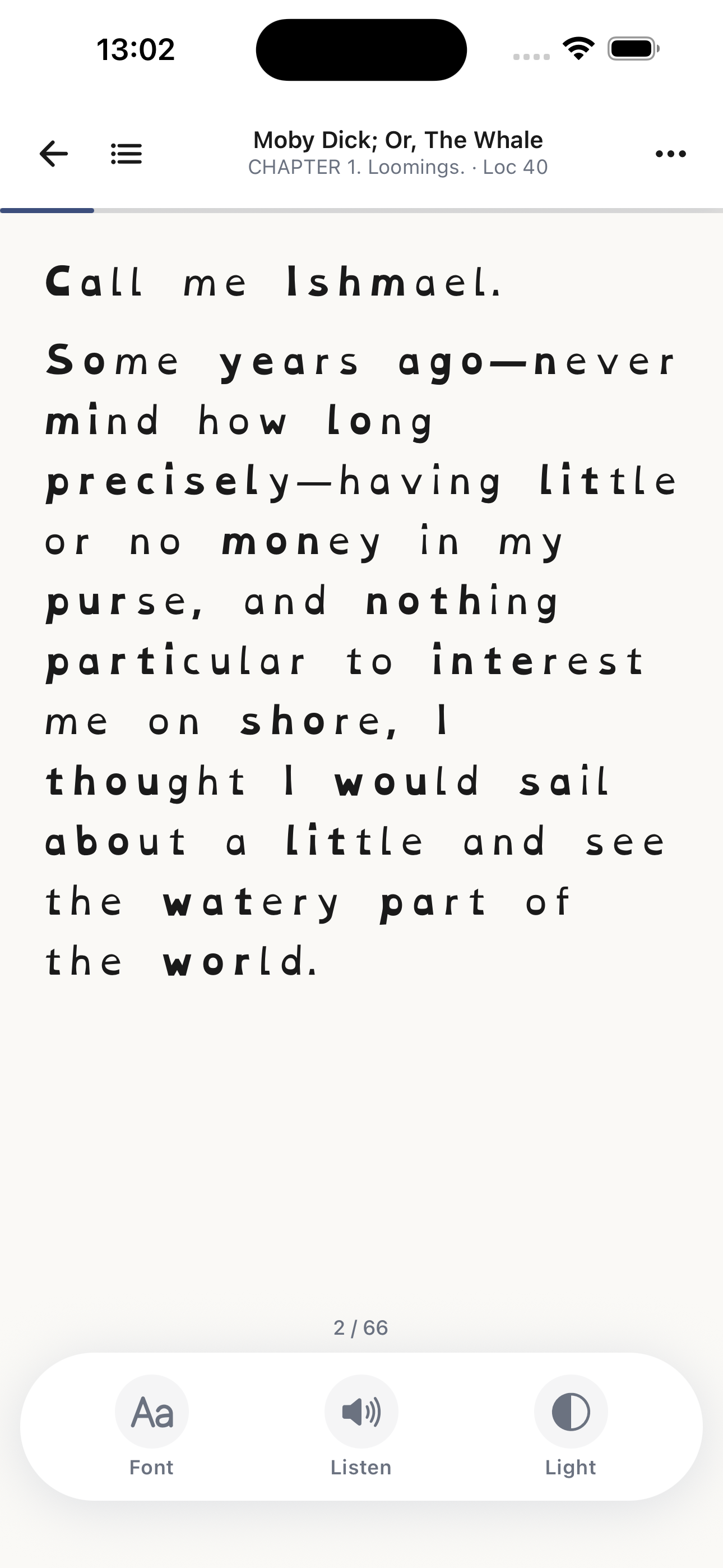
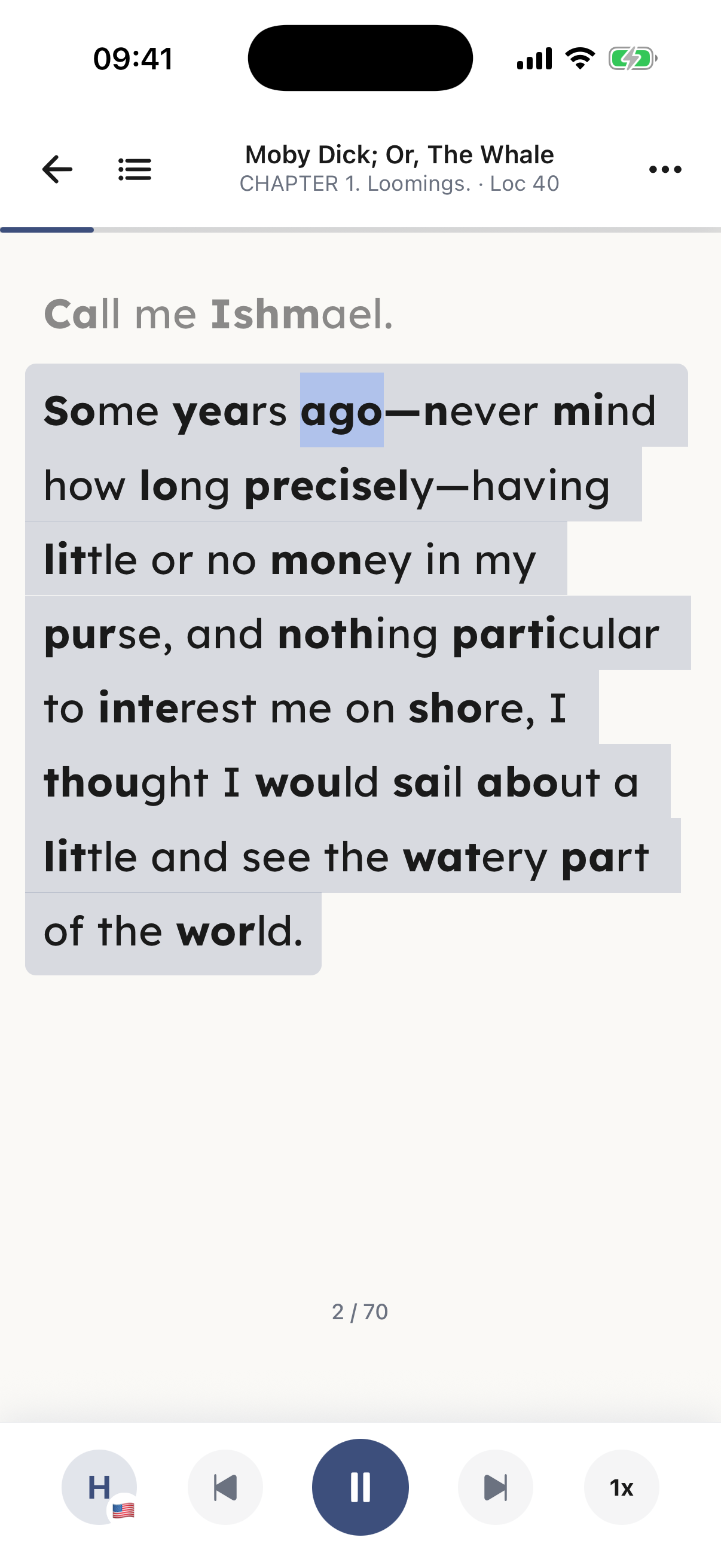
ClearRead reading Moby Dick aloud: the current paragraph is highlighted, the spoken word 'ago' is marked in blue, bionic reading bolds the start of each word, and playback controls sit at the bottom
FreeEvery reading tool included
8 fontsIncluding Lexend & OpenDyslexic
0.5x – 2.5xRead-aloud speed
ePub · PDF · WebPlus any pasted text
In plain words

What is ClearRead?

ClearRead is a free reading app for iPhone and iPad built for people with dyslexia, ADHD and visual impairments, and for anyone who reads better when they can listen along. It turns ePubs, PDFs, web articles and pasted text into a clean, distraction-free reading view, reads them aloud with word-by-word highlighting, and lets you tune fonts, spacing, layout and colours until the page fits your brain.

Platform
iPhone and iPad, iOS 17 or later
Price
Free, with optional ClearRead Premium for AI voices
Content
ePub, PDF, web articles by URL, pasted text
Fonts
Lexend, OpenDyslexic, Arial, Verdana, Helvetica, Calibri, Tahoma, System
Reading aids
Read-aloud with highlighting, bionic reading, focus mode, spacing controls
Developer
EC Digital
A look inside

Calm, clear and yours to adjust

The same quiet indigo design on every screen, in light or dark mode.

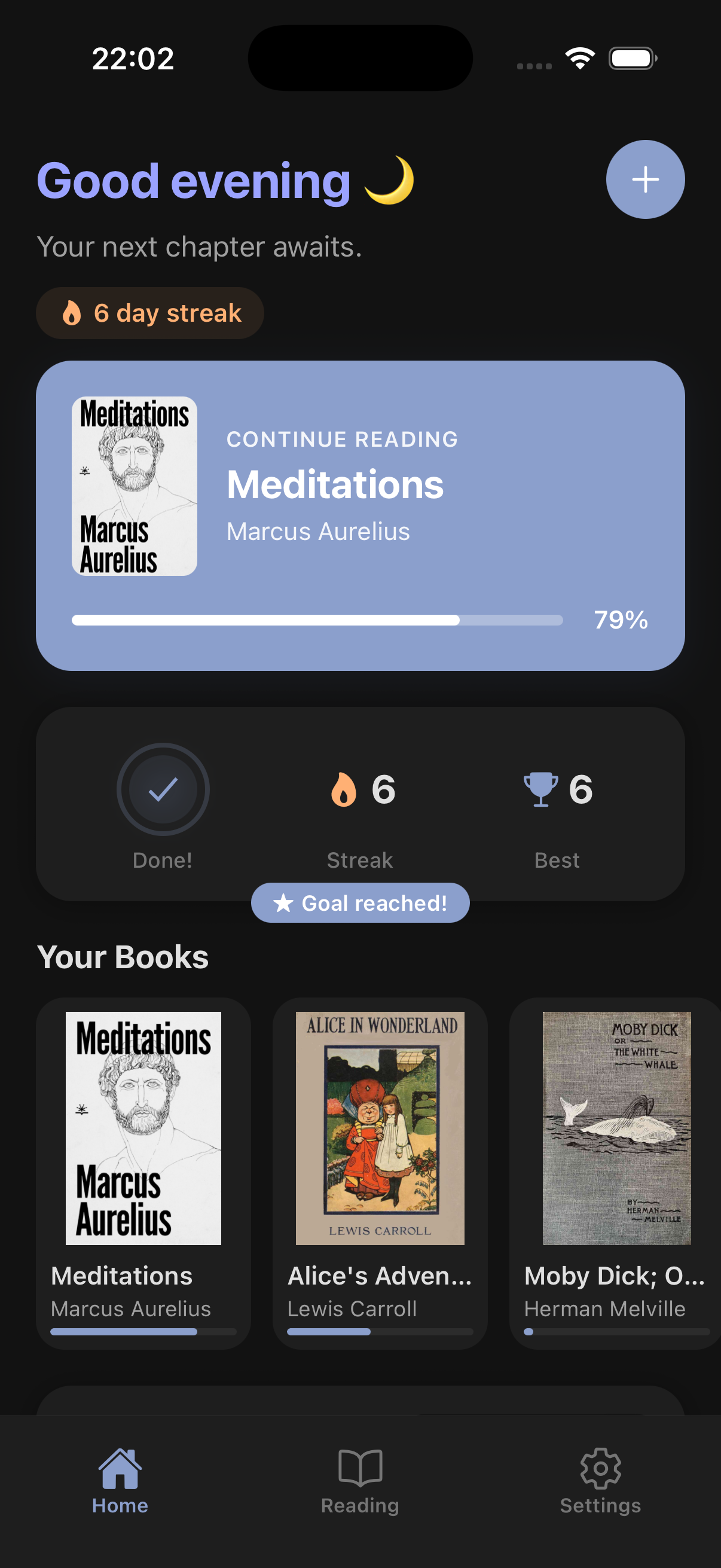
ClearRead home screen in dark mode with a greeting, a 6 day reading streak, a continue reading card and the book library
Your library, streak and daily goal
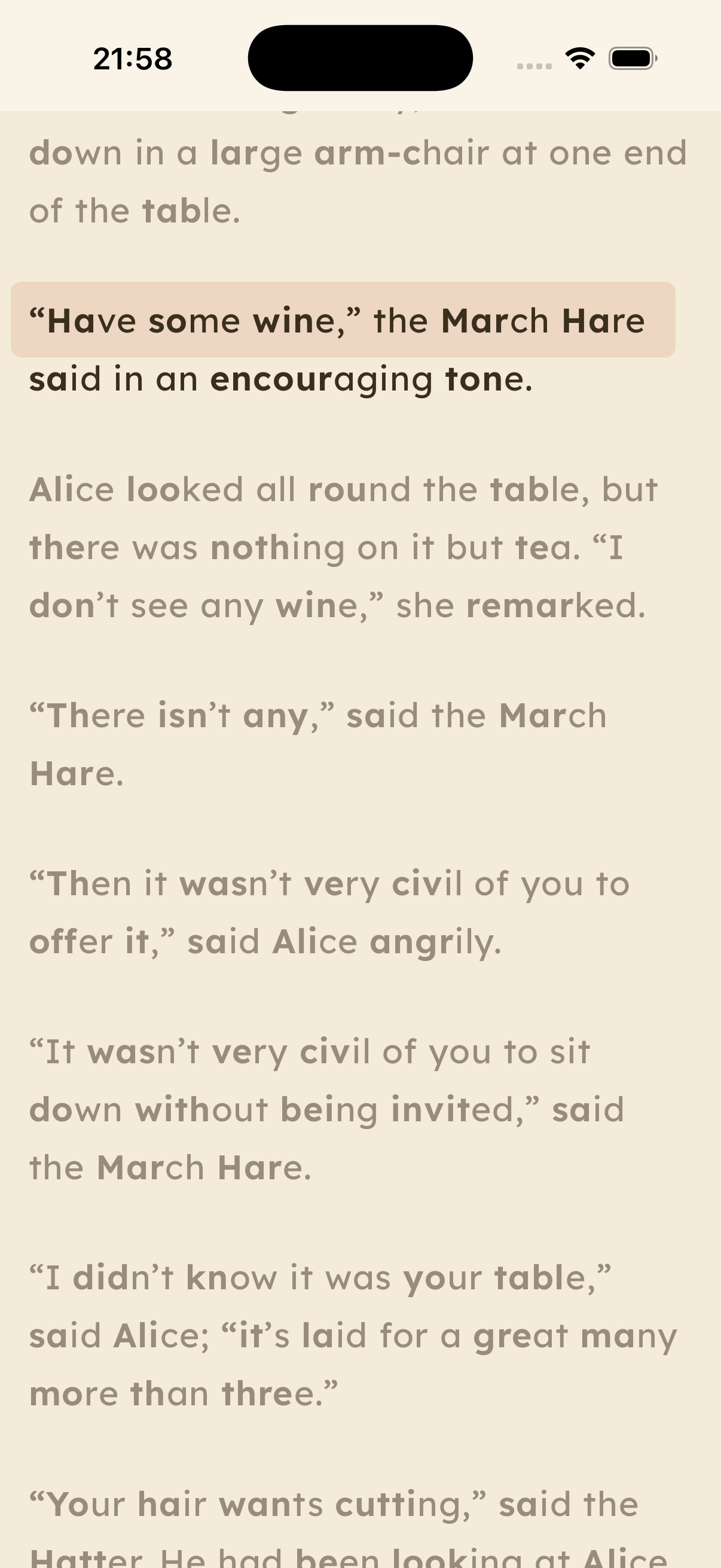
ClearRead reading view in light mode with focus mode highlighting the current line
Focus mode keeps you on the line
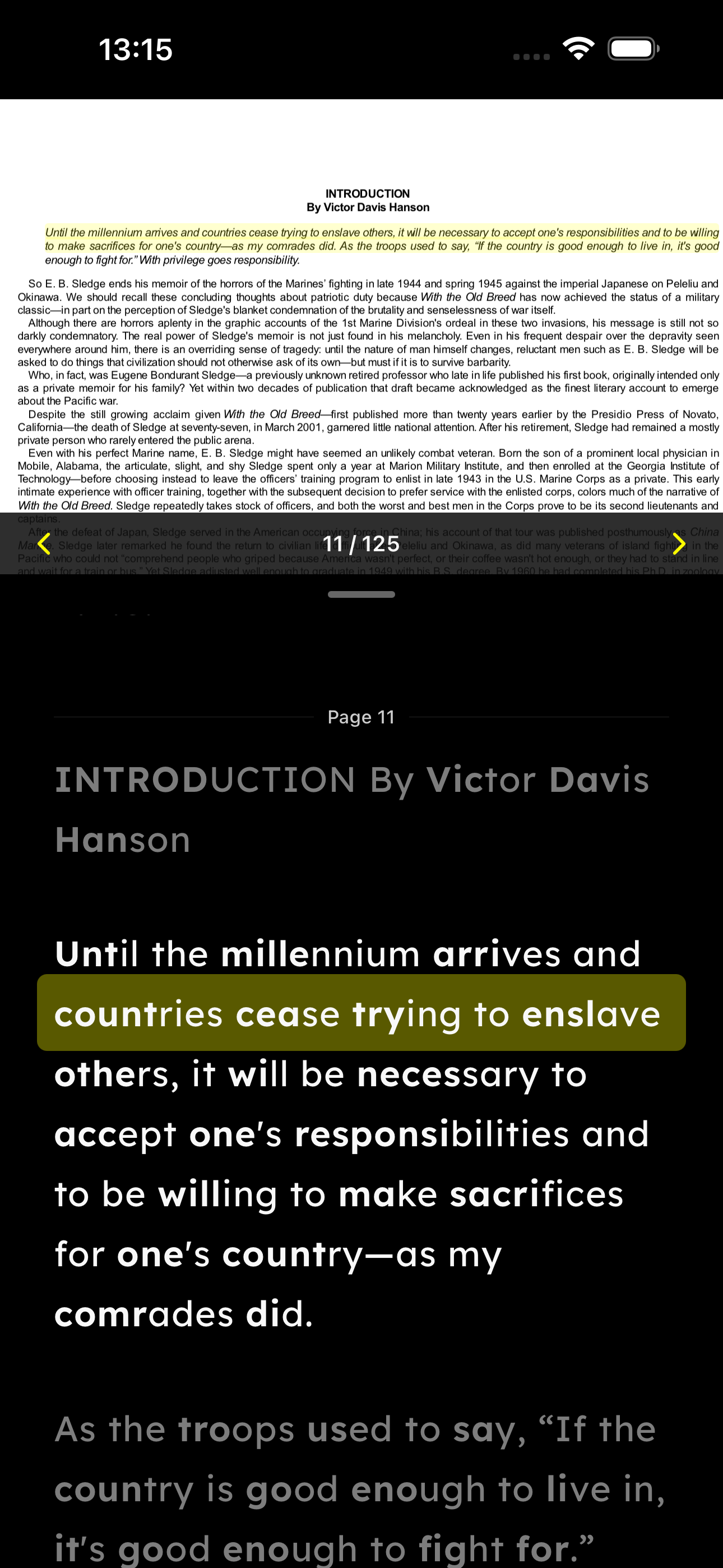
ClearRead PDF reading view in dark mode with the extracted text reflowed
PDFs reflowed with your settings
ClearRead typography settings showing font choice and spacing sliders
Fonts and spacing, tuned to you
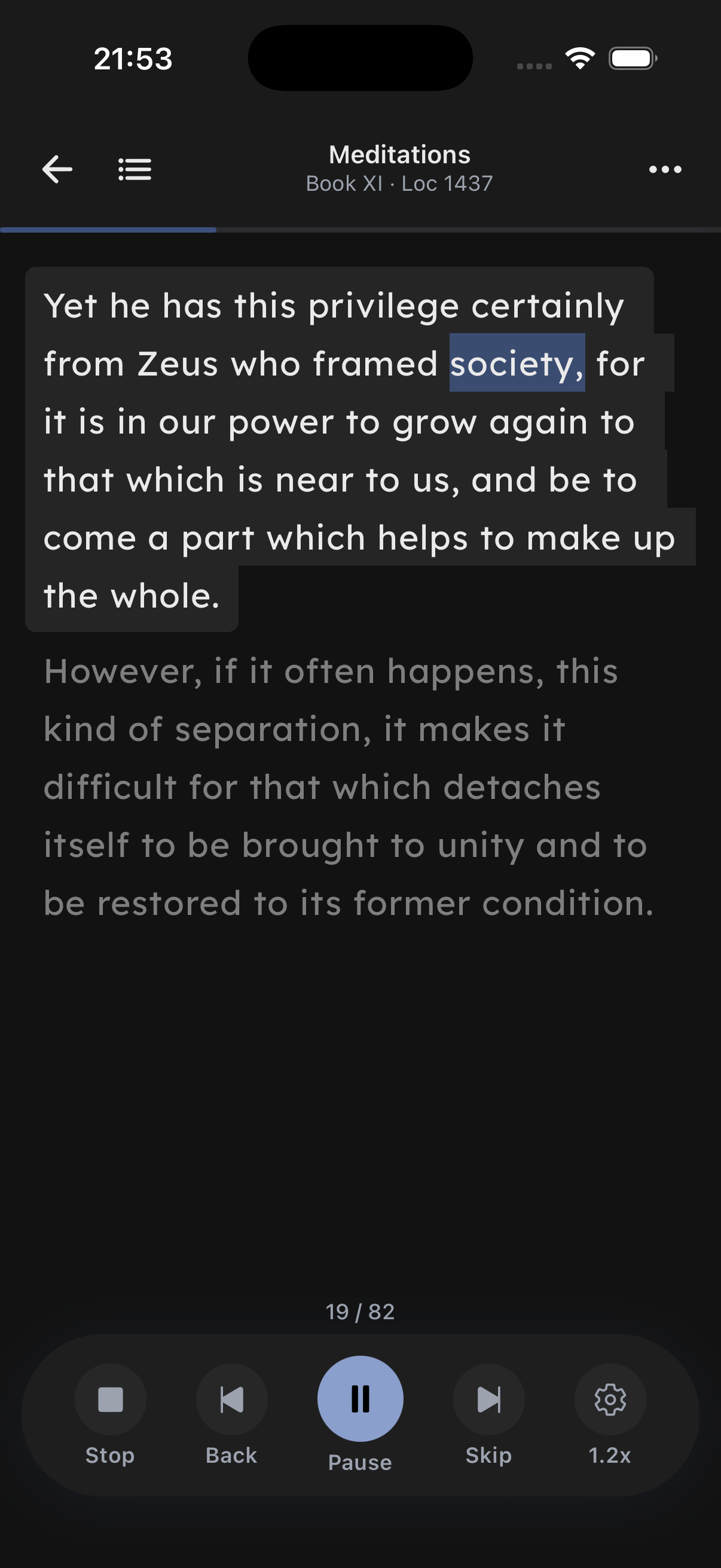
ClearRead text-to-speech in dark mode with playback controls and the spoken word highlighted
Listen with word highlighting
How it works

Three steps to easier reading

Add anything

Import an ePub or PDF, paste a link to a web article, or paste text straight in. ClearRead strips the clutter and keeps the words.

Make it fit

Pick Lexend or OpenDyslexic, widen the spacing, switch on bionic reading or focus mode, and choose a theme. Settings apply everywhere.

Read and listen

Tap Listen. Words highlight as they are spoken so your eyes and ears work together, at any speed from 0.5x to 2.5x.

Who it's for

Built for the way your brain reads

ClearRead removes the barriers that make ordinary text hard work. Here is what each group gets from it.

People with dyslexia

The challenge: letters crowd together, lines get lost, and decoding every word is exhausting.

How ClearRead helps: Lexend and OpenDyslexic fonts, independent letter, word and line spacing, tinted and high-contrast themes, and read-along audio that pairs each word with its sound.

People with ADHD

The challenge: attention drifts, pages get re-read, and long texts never get finished.

How ClearRead helps: focus mode dims everything but the current line, bionic reading gives your eyes anchor points, audio keeps you moving, and streaks and daily goals make progress visible.

People with low vision or eye strain

The challenge: small type, harsh contrast, and PDFs that refuse to scale.

How ClearRead helps: large adjustable type, dark, sepia and high-contrast themes or your own custom colours, PDFs converted to reflowable text, and text-to-speech for resting your eyes.

Features

Everything in ClearRead

All of these are free. Premium only adds nicer voices.

Read-aloud with highlighting

Text-to-speech that highlights each word as it is spoken, so you never lose your place.

Lexend & OpenDyslexic

Two fonts designed for readability, plus Arial, Verdana, Helvetica, Calibri, Tahoma and the system font.

Spacing you control

Font size, line height, letter spacing, word spacing and paragraph spacing, each on its own slider.

Bionic reading

The first part of every word is bolded to give your eyes fixation points and keep you flowing through text.

Focus mode

A soft highlight follows the line you are on while the rest of the page dims. Choose the strength that suits you.

Scroll or turn pages

Read continuously or page by page like a book. Progress and location are saved automatically.

Themes and custom colours

Light, dark, sepia and high contrast, or build your own theme from any background, text and accent colour.

PDFs made readable

ClearRead extracts the text from PDFs and reflows it with your fonts, spacing and colours, with the original page alongside.

Books, articles and text

Import ePub and PDF files, save any web article by pasting its link, or paste text directly into the app.

Speed from 0.5x to 2.5x

Slow down for dense material or speed up for review, in 0.1x steps.

Free and premium voices

Use the voices built into iOS for free, or upgrade to natural AI voices that run on your device.

Streaks and goals

A daily reading goal, streak counter and progress bars keep the habit going without nagging.

Why ClearRead

More than an audiobook, kinder than a standard eReader

Audiobooks replace reading. Most eReaders ignore how dyslexic and ADHD brains work. ClearRead does both jobs at once.

Comparison of ClearRead with audiobooks and standard eReader apps
CapabilityClearReadAudiobooksStandard eReaders
Reads your own ePubs, PDFs and articles aloudYesNo, fixed catalogueRarely
Highlights each word as it is spokenYesNoRarely
Lexend and OpenDyslexic fontsYesNot applicableSometimes one of them
Letter, word, line and paragraph spacingYes, each separatelyNot applicableUsually line spacing only
Bionic reading and focus modeYesNoRarely
Reflows PDFs with your settingsYesNoRarely
Free core experienceYesSubscription or per titleVaries
Pricing

Free means free

Every reading and accessibility feature is included at no cost. Premium exists only for people who want the nicest voices.

ClearRead

Free

  • Unlimited books, PDFs, articles and pasted text
  • Text-to-speech with system voices and word highlighting
  • All fonts, spacing controls, bionic reading and focus mode
  • All themes including custom colours
  • Reading streaks, goals and progress
  • No account required

Everything above stays free.

FAQ

Frequently asked questions

What is ClearRead?

ClearRead is a free reading app for iPhone and iPad made for people with dyslexia, ADHD, and visual impairments. It reads ePubs, PDFs, web articles, and pasted text aloud while highlighting each word, and lets you change the font, spacing, layout, and colours until reading feels comfortable.

Is ClearRead free?

Yes. ClearRead is free to download and use. Reading, text-to-speech with system voices, word highlighting, all fonts, spacing controls, bionic reading, focus mode, and every theme are included at no cost. An optional ClearRead Premium subscription adds natural-sounding AI voices and higher text-to-speech limits.

Which devices does ClearRead work on?

ClearRead runs on iPhone and iPad with iOS 17 or later and is available on the Apple App Store. An Android version is not yet available.

What can I read in ClearRead?

ClearRead opens ePub and PDF files from your device, saves web articles when you paste a link, and reads any text you paste in. PDFs are converted to clean reflowable text so your fonts, spacing, and colours apply to them too.

Is ClearRead good for dyslexia?

ClearRead was designed for dyslexic readers. It includes the Lexend and OpenDyslexic fonts, separate controls for letter, word, line, and paragraph spacing, a focus mode that keeps you on the current line, bionic reading, tinted and high-contrast themes, and read-along text-to-speech so you can see and hear every word together.

Does ClearRead help with ADHD?

Yes. Focus mode dims everything except the line you are reading, bionic reading gives your eyes fixation points, and read-along audio keeps your attention anchored to the page. Daily goals and reading streaks help you build a consistent habit.

What fonts does ClearRead offer?

ClearRead includes Lexend and OpenDyslexic, two typefaces designed for readability, plus Arial, Verdana, Helvetica, Calibri, Tahoma, and the system font. Font size, line height, letter spacing, word spacing, and paragraph spacing can all be adjusted independently.

How does text-to-speech work in ClearRead?

Tap Listen and ClearRead reads the text aloud while highlighting each word in sync. You can set the speed from 0.5x to 2.5x and choose from the voices built into iOS for free. ClearRead Premium unlocks natural-sounding AI voices.

What is bionic reading?

Bionic reading bolds the first part of each word so your eyes can jump between fixation points instead of decoding every letter. ClearRead can turn it on for any book, article, or PDF with one switch.

Does ClearRead work offline?

Yes. Once a book, PDF, or article is on your device, reading and text-to-speech with system voices work without an internet connection. Premium AI voices run on-device after they have been downloaded.

Who makes ClearRead?

ClearRead is developed by EC Digital. It is listed on the App Store as "ClearRead - Dyslexia Reader". Support is available at clearread.app/support.
Curious about the research behind reading while listening? See why read-along beats reading or listening alone.

Start reading comfortably today

Free on the App Store for iPhone and iPad. No account, no paywall for the essentials.

Android is not available yet. Tell us if you would like it.